
Your people, in every photo.
Photohawk finds the people in your camera roll, right on your phone, then shares photos with the people in them. Free for everyone you share with.
Photohawk: Friends & Family arrives on the App Store and Google Play on Monday 9 November. Receiving photos and chatting will always be free.





How it works
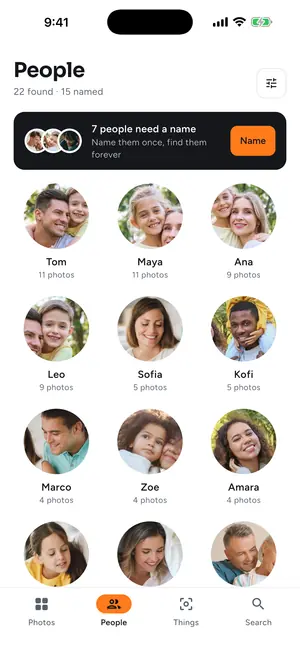
1. Your people, found
Your newest photos are ready in about two minutes; the rest follow while you use your phone.
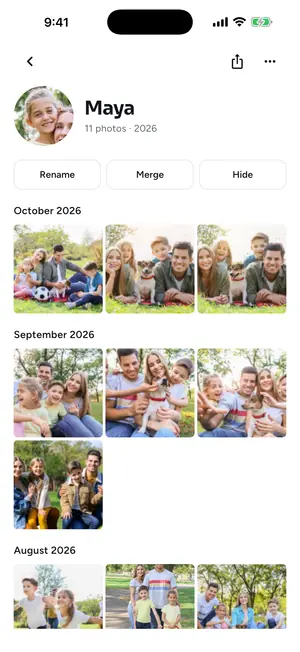
2. Name them once
Everyone gets a page with every photo and video of them, and you can search for “Maya in Lisbon”.
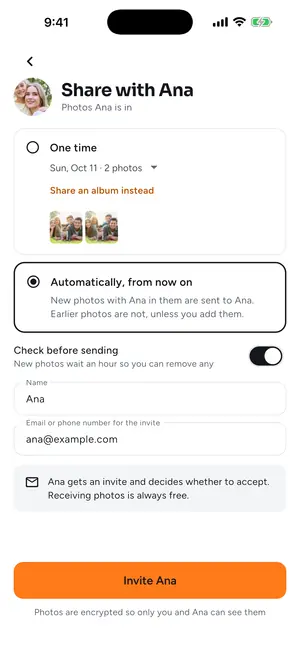
3. Share with them
Send photos of Grandma to Grandma, once or automatically from now on. For the first two weeks, you check before anything goes.
More than a photo app

Everyone, on their own page
Name someone once and see every photo and video they're in, year by year.

Trips and On this day
Trips gathered by themselves, and photos from this day in past years each morning.

Growing up
Children's ages on their photos, and two children side by side at the same age.

Prints and photo books
Print someone's year, with crops that keep everyone's face in.

Every photo, to everyone in it.

Birthdays, weddings and trips, together
Start a chat for the day and show its QR code: everyone joins and adds their photos, so everyone ends up with everyone's photos.
Chat one to one or in a group chat: messages, photos, captions, reactions and shared albums, all end-to-end encrypted.
Automatic sharing, with safeguards
Photos go on their own only when Photohawk is sure, and you stay in charge.
- Only strong matches are sent automatically; close calls wait for you.
- For the first 14 days, you check new photos before they are sent.
- Screenshots, documents and hidden photos are never sent automatically.
- Sent one by mistake? Unsend it within 24 hours.
- Location isn't shared unless you turn it on.
Private by design
Your photos stay yours

Faces are found on your phone.
Photohawk looks for faces in your photos on your phone. Your photos and videos stay there, and so do the names you give people. The face data on your phone isn't in your phone backups.
Only face cut-outs go to the cloud, with your consent.
To recognise the same person across your library, small cut-outs of each face (never whole photos or videos) are sent, encrypted, to a private collection that holds only your faces, in our cloud run by Amazon Web Services in Ireland (EU). The cut-outs are kept there, encrypted with a key for your account alone, so your faces can be matched again and we can help if something goes wrong; only our support team can see them, and every look is logged. Photohawk asks for your agreement before it makes any face data.
Photos leave your phone only when you share them.
Or when you order prints. Shared photos are end-to-end encrypted on your phone: only you and the people you share with can see them.
Delete it any time.
“Delete all face data” in Settings erases your face data at once, on your phone and in the cloud. Face data is never sold and never used for advertising.
One plan. Everyone you share with joins free.
Start with 7 days free: the free trial finds the people in your last 12 months of photos, up to 3,000 photos and videos. Then it's one monthly subscription, and the App Store shows the price in your currency before you buy. Cancel anytime.
Receiving photos, viewing them and chatting are always free. The people you invite never pay.
Questions
Is Photohawk free?
Photohawk: Friends & Family launches on Monday 9 November. It's free to download, with a 7-day free trial; after that it's a monthly subscription, and the App Store or Google Play shows the price in your currency before you buy. Receiving, viewing and chatting will always be free.
Are my photos uploaded?
No. Faces are found on your phone, and your photos stay there. To group faces into people, only small face cut-outs (never whole photos or videos) go to your own private collection in our cloud, with your consent. Photos leave your phone only when you share them or order prints.
Do the people I share with need to pay?
No. The people you invite chat and receive photos for free, and nothing on their phone is scanned.
Is Photohawk on Android?
Yes. Photohawk: Friends & Family launches on Google Play for Android phones, and on the App Store for iPhone, on Monday 9 November.
Can I delete my face data?
“Delete all face data” in Settings erases it at once, on your phone and in the cloud. Deleting your account erases it too.
Do I need an account?
Yes: you create one, or sign in, inside Photohawk on your phone. There is nothing to sign up for on the web.
Where is Photohawk available?
On the App Store for iPhone and Google Play for Android, from Monday 9 November. Photohawk won't be available to people who live in Illinois.