How to sell race and event photos: pricing, delivery and what participants actually buy
Business models, worked pricing examples, why speed to publish matters, a shoot-to-delivery workflow, huge events, and a checklist for choosing a platform.
In this guide
Selling event photos is a strange business. Your product is thousands of photos of people who didn't ask you to take them, most of whom will only ever look at a handful. The ones they buy are the ones they can find quickly, that show them at their best, and that are online while they still care. This guide is about getting those three things right: how to charge, how to deliver, and how to choose the platform that does the delivering.
It's written for photographers selling race and event photos, though most of it applies to anyone covering participation events, from parkrun-style runs to triathlons, cycling sportives, dance competitions and school sports days.
Three ways to get paid
Before you set a price, decide who's paying. There are three common models, and many photographers use all three across a season.
| Model | Who pays | Works best when | Watch out for |
|---|---|---|---|
| Sell per photo | Each participant, for each photo they want | You're covering a big field, and nobody pays you up front | Your income depends on how easy it is to find and buy |
| Packages and bundles | Each participant, once, for all their photos | People appear in several photos (start, course, finish) | Price it so it's clearly better value than two or three singles |
| Free downloads paid by the organiser | The organiser or a sponsor, as a fee to you | The event wants photos to be a perk of entering | Agree the fee before the event and cover your costs per photo |
Selling per photo and bundles usually live together: a single price for the one shot someone loves, and a bundle for the person who finds themselves six times. Organiser-paid galleries work differently. The organiser pays you a fee, and every participant downloads their photos free, often with the sponsor's branding on the gallery.
On Photohawk, each gallery is set to one of two modes: Selling mode, where photos are for sale, and Sharing mode, where they're free to download. One workspace can run both kinds of gallery, so you don't need a separate setup for your organiser-paid work.
Pricing: what participants actually buy
People don't buy coverage; they buy moments. The photos that sell are the ones where the buyer is clearly the subject, recognisable, and doing something they're proud of. In practice that means:
- The finish. Arms up, the clock or arch in the frame, a look of relief or delight. If you can only cover one spot, it's usually this one.
- Action that flatters. Both feet off the ground, a strong stride, a determined face. Mid-shuffle at mile 20 sells less well, however honest it is.
- People together. Friends finishing side by side, a parent with a child, a club in matching kit. Each person in the photo is a potential buyer.
- Variety, not volume. Ten near-identical frames of one person compete with each other. Three different moments of the same person make a bundle worth buying.
A worked example: singles and a bundle
Suppose you price a single photo at $12 and a bundle of every photo someone appears in at $29. These are illustrative numbers, not a recommendation; set yours from your market. On Photohawk's Pro plan, the commission is 16%, charged on sales only. Card fees are separate: on your own Stripe account in the US, Stripe's standard card rate is 2.9% + $0.30.
| Sale | Price | Commission (16%) | Card fee (2.9% + $0.30) | You keep |
|---|---|---|---|---|
| One photo | $12.00 | $1.92 | $0.65 | $9.43 |
| A bundle | $29.00 | $4.64 | $1.14 | $23.22 |
The bundle earns you more than twice the single price for the same person, and the buyer gets every photo they're in. That's why the bundle price matters more than the single price: it should feel like the obvious choice once someone has found three or four good shots of themselves. Card fees vary by country and card type, so check your provider's rates for your own market.
Choosing a plan by your sales
Every Photohawk plan has a monthly price and a commission on sales; the higher plans cost more each month and take less of each sale. Which one costs you least depends on how much you sell. These are the plans on our pricing page as of October 2026:
| Plan | Monthly price | Commission on sales | Storage included | Each photo in a free-download gallery |
|---|---|---|---|---|
| Pay as you go | $0 | 25% | 25 GB | $0.02 |
| Lite | $16.99 | 18.5% | 100 GB | $0.0135 |
| Pro | $29.99 | 16% | 500 GB | $0.01 |
| Enterprise | $44.99 | 13.5% | 1 TB | $0.008 |
Here's what each plan costs you in a month, as its monthly price plus its commission, at four levels of sales (card fees aside, since they're the same on every plan):
| Monthly sales | Pay as you go | Lite | Pro | Enterprise |
|---|---|---|---|---|
| $200 | $50 | $53.99 | $61.99 | $71.99 |
| $500 | $125 | $109.49 | $109.99 | $112.49 |
| $1,000 | $250 | $201.99 | $189.99 | $179.99 |
| $2,500 | $625 | $479.49 | $429.99 | $382.49 |
On cost alone, Pro costs less than Pay as you go once you sell more than about $333 a month, and Enterprise costs less than Pro above about $600 a month. Cost isn't the only difference, though: features differ by plan too. A custom domain, for example, is on Pro and Enterprise only. Previews first and an on-demand FTP server come with every plan. Compare the plans side by side on the pricing page.
A worked example: an organiser-paid gallery
An organiser wants free photos for all 1,500 entrants. You expect to deliver about 3,000 photos. In a free-download gallery, Photohawk charges per photo uploaded: on Pro that's $0.01 a photo, so 3,000 photos cost $30; on Pay as you go at $0.02 a photo, $60. Add that to your day rate, editing time and travel when you quote the organiser, and agree the fee before the event, not after.
Speed to publish is what sells
If there's one lesson from the galleries we host, it's this: in our experience, the sooner a gallery is live, the better it sells. People look for their photos while the event is still fresh: on the way home, that evening, the next morning while they're sharing results with friends. A gallery that goes live days later is competing with everything else in their week.
That's a pattern we see, not a law, and we don't have a single figure for it, so treat it as a strong rule of thumb. It's why most of what follows is about getting photos online faster:
- Upload from the venue if you can. Even a mobile connection is enough to get the first batch online.
- Don't over-edit. Participation photos sell on the moment, not on the grade. Fix exposure and straighten horizons in batches; save the careful edits for the shots you'll use in your portfolio.
- Ask the organiser to share the link. The results email, the event's social pages and the finish-area screens reach every participant at once.
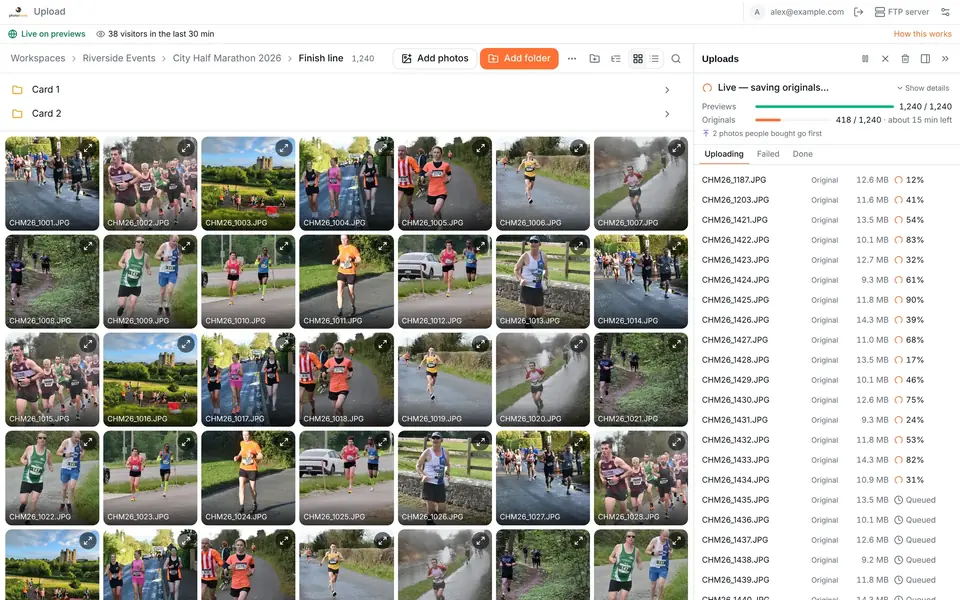
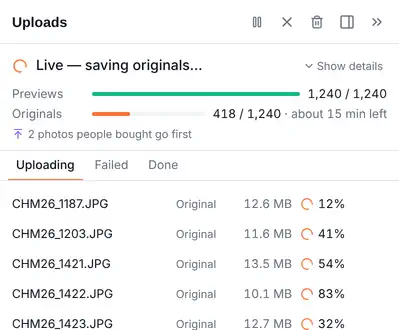
On Photohawk, the web uploader sends many photos at once and keeps adjusting to make full use of your connection. With previews first, on every plan, light previews go up first, so the gallery can go live and start selling while the originals follow: a 10,000-photo gallery can be live in about 8 minutes on a 20 Mbps upload. Search works on the previews, so people can find themselves straight away.
A workflow from shoot to delivered originals
- ShootCover the moments people buy: start, course, finish.
- UploadAdd the folder to the web uploader, on any plan.
- Previews liveLight previews go up first, so the gallery goes live while the originals follow.Every plan
- OrdersPeople find themselves by selfie or bib, then buy or download.
- OriginalsBuyers get the originals. A bought photo's original jumps the queue.Queue jump: every plan
- Shoot. Before the start, set your clock to the right time, to the second if you can. Matching photos to times on the course makes your galleries easier to browse and your follow-up questions easier to answer.
- Cull lightly. Remove blinks, blur and empty frames. Keep anything where a participant is recognisable: someone, somewhere, wants that photo.
- Organise into folders. Start, course points, finish, presentations. Folders help people browse when search misses them, and help you upload in priority order (finish first, usually).
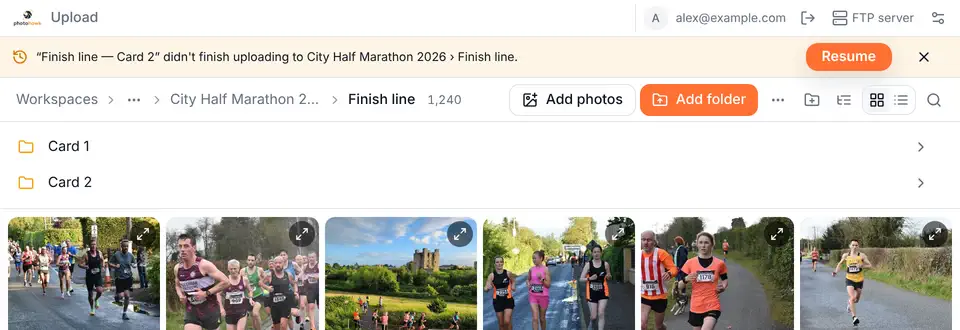
- Upload. Add the folder to the web uploader; it's on every plan. If the connection drops, it resumes by itself, and adding the folder again sends only what's missing.
- Go live. Publish when the photos are up. With previews first, you can publish as soon as the previews are up, or let it happen on its own.
- Let people find themselves. Bib numbers and faces are found automatically, so participants search by bib number or selfie without you tagging anything.
- Deliver. Buyers get the originals. With previews first, if someone buys a photo before its original has arrived, that original jumps the queue, and their order goes out as soon as it lands.
Handling huge events
Big city marathons, multi-day festivals and mass-participation rides produce galleries of tens of thousands of photos, sometimes far more. The basics still apply, but a few things change at scale:
- Plan your storage. Event JPEGs are often around 10 MB each, so 100,000 originals are roughly a terabyte. Check what your plan includes (500 GB on Pro, 1 TB on Enterprise) and what extra storage costs on the pricing page before the event, not after.
- Split the work. Give each shooter their own folder (by location, or by shooter) so uploads run side by side and nobody overwrites anyone else.
- Prioritise what sells. Upload the finish and the most photographed points first. Previews first gets the whole gallery live sooner, but upload order still decides what's searchable first.
- Keep the uploader open until the originals finish. You can close it early without losing anything (add the folder again later and only the missing originals are sent), but buyers waiting for an original wait longer.
- Watch the gallery, not just the upload. The uploader's status bar shows how many people are viewing your gallery right now, on every plan. A spike tells you the link has gone out.
The Photohawk web uploader is built for events of more than 100,000 photos, and it picks up where it left off if your connection drops. Across all galleries, more than 75 million photos have been uploaded to Photohawk so far.

Choosing a platform: a checklist
Whichever platform you choose, ask these questions before you commit a season's work to it. They're the ones that decide whether people find their photos and whether they buy.
Finding photos
- Can participants search by bib number and by selfie, without you tagging anything?
- Does search work on a phone, without downloading an app or creating an account?
- Can people search across a whole event, not just one folder?
Speed and reliability
- How long does a big gallery take to go live from the venue's connection?
- If the connection drops halfway through, does the upload resume by itself, or do you start again?
- Can the gallery go live before every original has finished uploading?
Selling
- Can you sell singles and bundles, and run free-download galleries, from one account?
- Are the fees clear: monthly price, commission, any per-order fee, card fees, storage, and the cost of free downloads?
- Do payments go to your own account, and when?
- Are previews protected well enough that people buy rather than screenshot?
Your brand and your participants
- Can galleries carry your branding and your own domain?
- Is there a published policy for face data: how it's used, how long it's kept, and how people ask for it to be deleted?
- When a participant has a problem, who helps them, and how fast?
For what it's worth, here's how Photohawk answers: participants find themselves by bib number or selfie; the web uploader resumes by itself and can go live on previews first, on every plan; each gallery sells or shares; previews are watermarked, with optional preview protection; custom domains are on Pro and above; and our biometric data retention policy sets out exactly when face data is deleted. We're used by more than 450 members in 29 countries, and we've detected more than 185 million people in event photos.
Learn morePhotohawk for photographersUpload, watermark and sell event photos, with bib and face search, branded galleries and secure checkout.Questions people ask
How much should I charge for a race photo?
There's no single right price; it depends on your market, the event and how many photos each person appears in. Set a single-photo price people buy without thinking twice, and a bundle for everything they're in that's good value once they've found three or four photos they like. Then look at what sold after a few events and adjust.
Should I sell photos or give them away free?
Both work. Selling suits events where nobody is paying you up front. Free downloads suit events where the organiser or a sponsor pays you instead. On Photohawk you choose per gallery, so one workspace can do both.
How fast do I need to publish?
As fast as you reasonably can. In our experience, interest is highest in the hours and days after an event, while people are still sharing their results. The same day is a good target.
What do buyers receive?
The originals, without the watermark. They browse watermarked previews, find themselves by bib number or selfie, buy, and download the originals.
Can I still upload by FTP?
Our always-on shared FTP servers close on 1 November 2026. The web uploader is the standard way to upload, on every plan. If FTP is essential to your workflow, everyone in your workspace can start their own on-demand FTP server, on every plan.
What does Photohawk charge?
A monthly plan price (from $0) plus a commission on sales, charged on sales only. Card fees are separate. Free-download galleries are charged per photo uploaded. See pricing for the current plans.
Written by
The people who build and run Photohawk
We build Photohawk, the platform event photos are shared and sold on, and we answer its support inbox. These guides come from what we see every week: how galleries are set up, how people search for their photos and what they ask us when something goes wrong.
Published · Updated · Last reviewed